Welcome.Voxboxcustomers:yourvoicemailhasanewhome.
Voxbox is winding down. Simtex — part of Zettagrid — gives you everything you had, plus unlimited inbound minutes, AI voicemail transcription, and a drag-and-drop call flow designer. We handle the move for you.
What you get on day one
Everything Voxbox did — and a lot more
Voxbox gave you a single number that answered, played your greeting, recorded the message, and emailed it to you. Simtex keeps all of that and adds real call control on top:
- Unlimited inbound minutes — every call your number answers, every voicemail transcribed by AI. No more 200/500/1000 caps.
- AI voicemail transcription, no length limit — read messages as text, with appointments, phone numbers and key details pulled out automatically.
- Drag-and-drop call designer — build menus, route to numbers or recordings, change your call flow yourself in minutes.
- Schedules & forwarding — forward on a schedule, route to a mobile, send to a different team after hours. Outbound to landlines is unlimited; calls forwarded to mobiles are billed at $0.089/min.
- SMS notifications — get a text when a voicemail arrives. Charged at $0.20 per 140-character SMS. Your existing Voxbox SMS destinations are migrated across.

We set up a basic IVR for you — like-for-like with your Voxbox service
During migration we automatically build a basic IVR with three steps — exactly mirroring what your Voxbox service does today:
- Answer the call
- Play your greeting
- Send the caller to voicemail
It lands working out of the box. No setup, no learning curve — your callers get the same experience they have today.
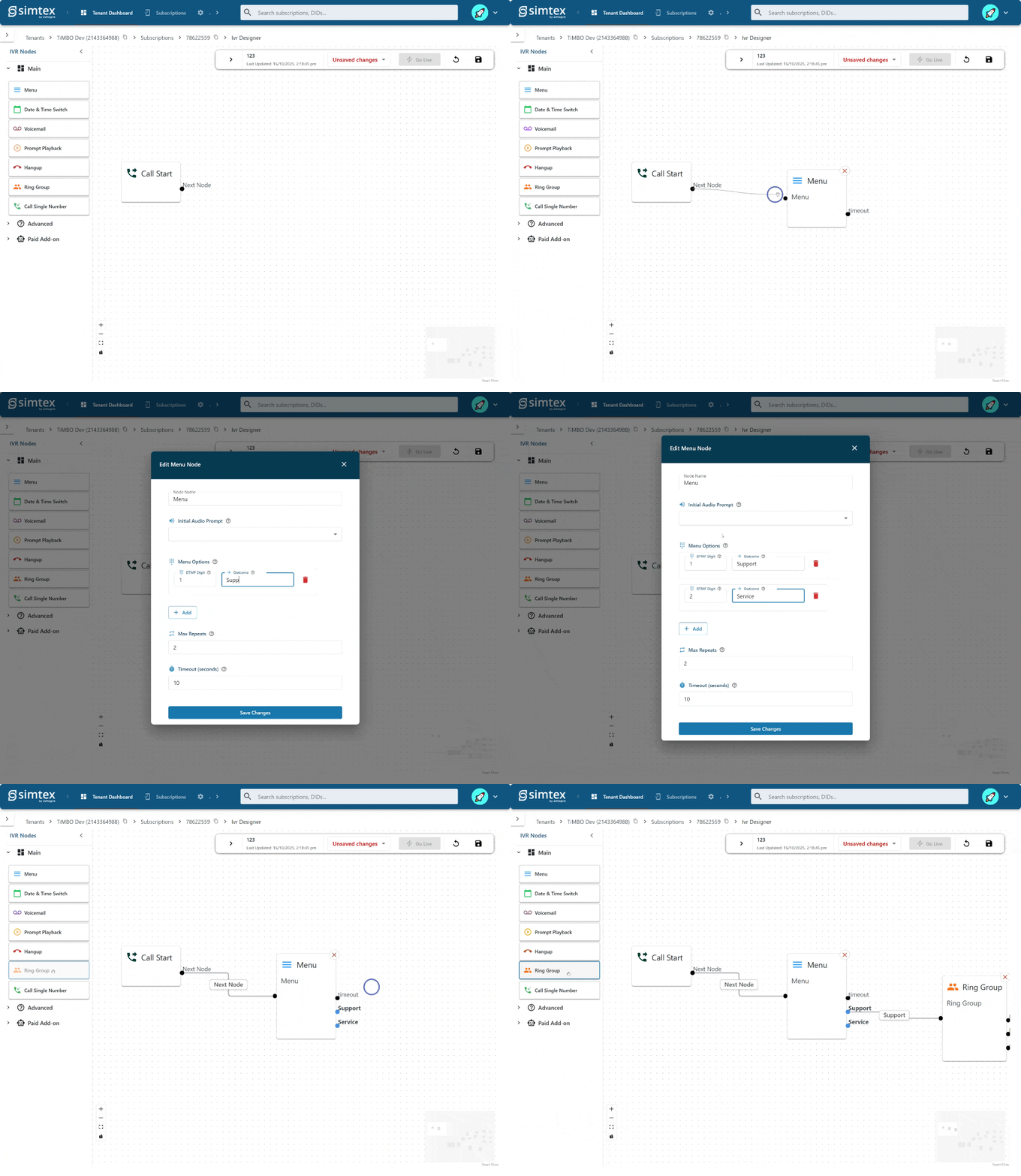
Want to do more? Log into account.mycloudvoip.com.au and use our drag-and-drop IVR Designer to add a menu, route by time of day, forward to a mobile, or send to a different team after hours.
See the designer in action
A live call flow takes shape — drag, drop, connect, publish.

Route calls by time and date
Open hours, after hours, public holidays — set it once and let the system follow your schedule. Calls go where they should without you lifting a finger.
How your migration works
You start it from the Voxbox portal. We do the rest.
- You do this
Log into your Voxbox portal
Open the Voxbox portal and head to Account Settings → Migrate Account. You'll see the migrate-to-Simtex form (shown below).

- You do this
Enter payment + billing details in Voxbox
Voxbox can't pass your stored card across, so you re-enter card holder, card number, expiry, contact mobile and a billing address. The form sends straight to our payment provider — Voxbox doesn't store your card, and neither do we (only our PCI-compliant provider does). We need the billing address because Simtex is a registered telco and that's required for any service capable of outbound calls.
- You do this
Save your new mycloudvoip password
Your new Simtex username and password are shown on the Voxbox confirmation page. Copy the password somewhere safe — Voxbox will only display it once. (You can change it anytime once you log in.)
- We handle this
We provision your new service
Your Cloud PBX service is provisioned on PhoneEssentials, your number is ported across, and your voicemail destinations + greetings are imported automatically. Your existing SMS notification destinations come across too.
- We handle this
Welcome email arrives
You receive a welcome email confirming your service is live. Your Simtex username is your account number plus @mycloudvoip.com.au (e.g. 100123@mycloudvoip.com.au). The email links to your dashboard and reminds you that you can change your password anytime.
- You do this
Manage your service
Run your voicemail, build IVRs, schedule call flows and update your password at account.mycloudvoip.com.au — your VoIP control centre.
- You do this
Manage billing & invoices
Payment methods, invoices and account management live at https://account.zettagrid.com. Zettagrid owns Simtex; all financial management for any Zettagrid/Simtex service happens there.
Migration questions, answered
No. We port your existing Voxbox number to Simtex, so your callers reach you on the same number.
Ready to bring your number across?
Start your migration from the Voxbox portal — we'll take it from there. Questions first? Our Australian team is a call or email away.