Zero Touch Provisioning
Cloud PBX from $4.85/month
Hosted phone system for Australian businesses. Geo-redundant infrastructure, crystal-clear audio, and Aussie-based support — backed by Zero Touch handset provisioning.
What is Zero Touch Provisioning?
Zero Touch Provisioning (ZTP) lets supported handsets configure themselves automatically — no manual setup, no logging into the phone's web interface, no copying configuration files around. Plug the handset in, give it internet access, and it pulls its settings and firmware from Simtex on first boot.
Every Yealink and Polycom handset ships with a unique MAC address. Our provisioning platform binds that MAC to your account, and the manufacturer's redirection service points the handset at our servers. Once the phone is online, it downloads its configuration from Simtex and joins your phone system.
From that moment on, the handset talks only to Simtex. It will not contact Yealink or Polycom again unless you factory reset the device.


The Provisioning Card
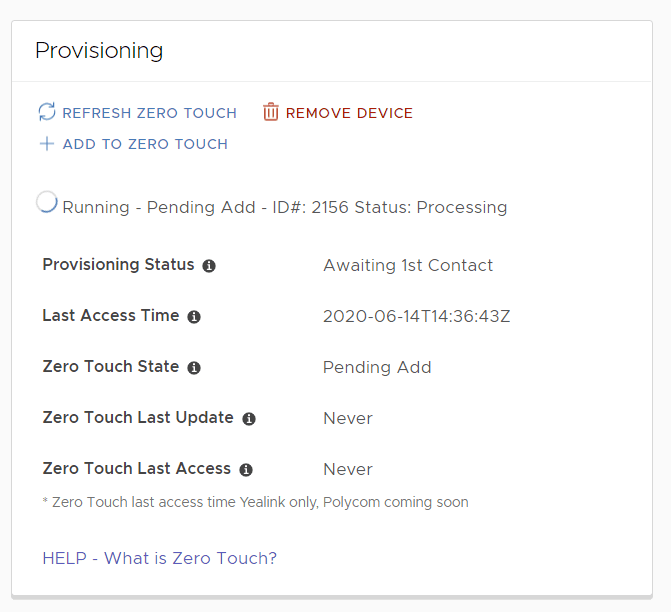
Each handset in your portal has a Provisioning Card on its detail page. To find it, open a subscription, click into a handset, and scroll to the Provisioning section. The card surfaces the information our system uses to fault-find provisioning issues, plus the status of any background jobs currently running against the device.
Provisioning Card fields
| Field | What it shows |
|---|---|
| Provisioning Status | Whether the handset is running the latest config we hold for it. Updates each time the handset checks in. Change a handset setting and this flips to Awaiting 1st Contact; once the phone pulls the new config, it returns to Current. |
| Last Access Time | The most recent date and time the handset successfully pulled configuration from Simtex. |
| Zero Touch State | The current binding state of the MAC address with Yealink or Polycom (see the next table for the full list of values). |
| Zero Touch Last Update | When a Zero Touch job last ran against this handset and produced one of the states below. |
| Zero Touch Last Access | The last time the handset itself contacted Yealink or Polycom. This usually stays in the past — see the callout below for why. |
Zero Touch State values
| State | Meaning |
|---|---|
| OK | MAC address is bound to Simtex. Nothing to do. |
| Bound Another Provider | MAC address is currently linked to another service provider. Contact your previous provider to release it (see below). |
| Mismatched Binding | MAC address is linked to our older provisioning platform. Run the Add to Zero Touch task to fix the binding. |
| Missing | MAC address does not exist on the Zero Touch platform. |
| Removed | MAC address has been successfully removed from Zero Touch. |
| Pending Add | A job is running to bind this MAC address to Simtex. |
| Pending Remove | A job is running to remove this MAC address from Simtex. |
| Pending Lookup | A refresh job is running to check the current Zero Touch status. |
| General Error | Something went wrong. Get in touch with our support team. |
Why does Zero Touch Last Access look stale? A handset only contacts Yealink or Polycom once — when it first boots and asks where to provision from. After that, all communication is with Simtex, so the manufacturer's records do not update. To see the current value, click Refresh Zero Touch — we then query Yealink or Polycom on demand.
Adding new handsets
For brand-new Yealink and Polycom handsets, our system binds the MAC address to Simtex automatically when the device is added to your account. No manual steps required.
Handset previously used elsewhere
If the handset was bound to another service provider — common with second-hand or transferred devices — the Provisioning Card shows Bound Another Provider in the Zero Touch State field.
We can attempt to remove another provider's binding if you get in touch with us - we will need the exact brand, model, MAC address and serial number of the device.
Available actions
Refresh Zero Touch
Queries Yealink or Polycom for the current binding state and the last time the handset contacted them. Use this when you want a fresh Zero Touch State reading, or when you have factory reset a phone and want to confirm it has called home.
Add to Zero Touch
Fires a job to add the MAC address to Yealink or Polycom and bind it to Simtex. Useful for handsets in Mismatched Binding or Missing state.
Remove Device
Removes the handset from our provisioning servers and runs a job to unbind and delete the MAC address from Yealink or Polycom.
Remove Device is not reversible. If a handset is removed, you will need to re-add and rebuild it from scratch — including lines, BLF keys, and expansion modules. Use it only when you genuinely want the device gone.
Common questions
Handsets contact Yealink or Polycom only on first boot, then talk exclusively to Simtex. The manufacturer's records won't move forward unless you factory reset the phone and let it call home again. To force a fresh check, click Refresh Zero Touch — we'll query the manufacturer on demand.
Ready to ditch your old phone system?
Simtex Cloud PBX gives you Zero Touch handset rollout, geo-redundant servers, and Australian-based support — from $4.85 per user per month.