Connecting to Teams PowerShell environment
Many administration tasks for Teams require the use of PowerShell. To connect to the Teams environment via PowerShell, do the following:
-
- Launch an elevated (administrator) PowerShell console by clicking Start, typing PowerShell, right-click and select Run As Administrator
- If this is the first time you’re doing this, you must install the Teams module:
Install-Module MicrosoftTeams
- Sign in using modern authentication (must have MFA)
Replace <UPN> with a username@domain with administrator access#Connect to Microsoft Teams Connect-MicrosoftTeams -AccountId <UPN> #Connection to Skype for Business Online and import into Ps session $session = New-CsOnlineSession Import-PsSession $session
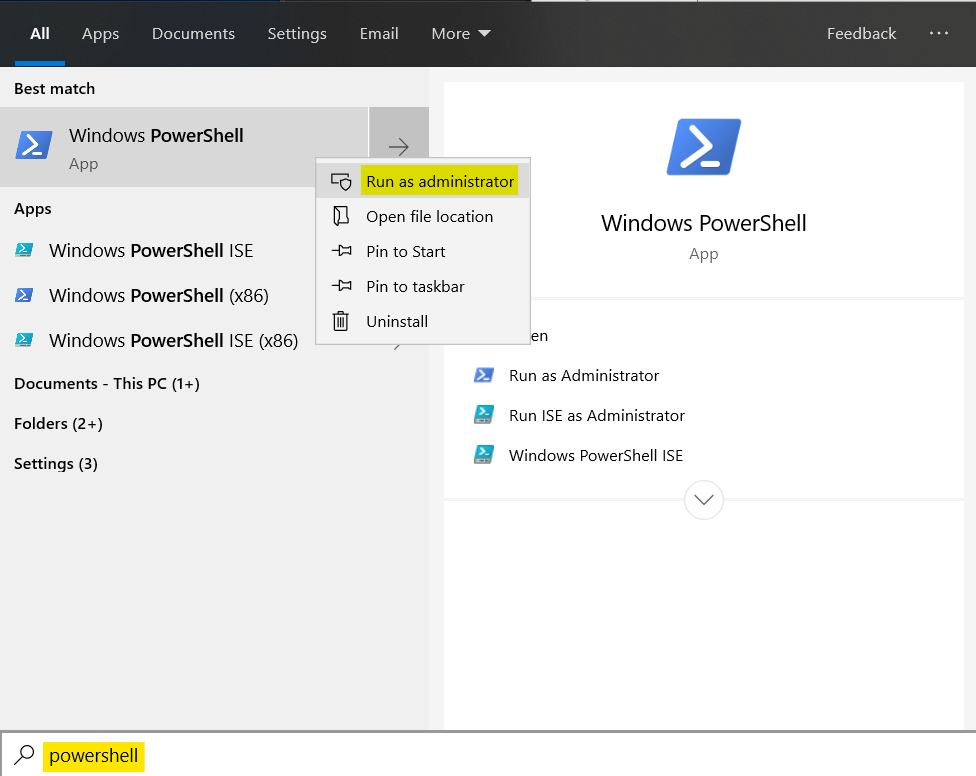
- Launch an elevated (administrator) PowerShell console by clicking Start, typing PowerShell, right-click and select Run As Administrator
Last updated 11 May 2026