Set up Bria Enterprise on Windows
Bria Enterprise is included with selected Cloud PBX plans
PhoneEssentials, PhonePlus and PhoneMax include a free Bria Enterprise softphone, so every person can take calls on their computer or phone.
The 60-second version
- Install Bria Enterprise (for Windows).
- Allow the permissions it asks for.
- Sign in with your full username, including the domain (
name@your-domain), and your Bria password. - Make a test call.
You'll need: A Windows 10 or 11 PC, a headset (recommended), and your Bria username and password.
Install Bria Enterprise specifically. Bria Solo, Bria Teams and Bria Mobile won't accept a Simtex login.
Set up Bria on Windows
- You do this
Download and install
Download the Windows installer (.msi), open it and follow the prompts. You may need administrator rights on the PC.
- You do this
Allow Bria through the firewall
If Windows Defender Firewall asks, allow Bria Enterprise on private networks so calls can connect.
- You do this
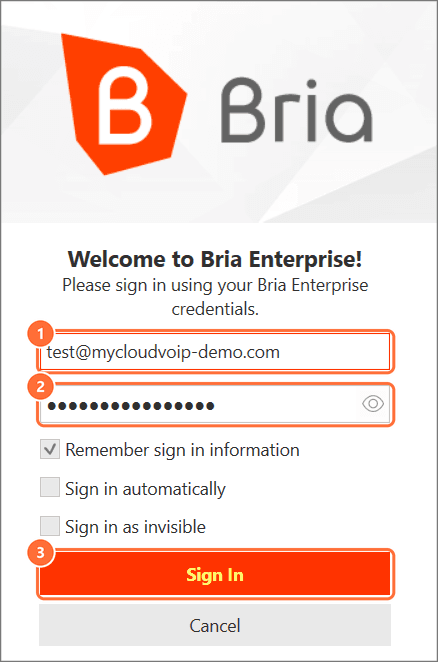
Sign in
Open Bria Enterprise. Enter your full username (name@your-domain) and your Bria password, then click Sign In.
- You do this
Choose your headset
In the Bria window, use the headset menu to pick the microphone and speaker you'll use for calls.
- You do this
Make a test call
Type a number in the Enter name or number box and click the green call button. Try your mobile to check both directions.
Troubleshooting
| Symptom | Likely cause | Fix |
|---|---|---|
| Calls connect but there's no audio | Wrong microphone or speaker selected, or the firewall blocked Bria | Pick your headset in Bria's audio settings, and allow Bria Enterprise in Windows Defender Firewall |
| Bria keeps showing old settings after a reset | Cached profile on the PC | Sign out, close Bria, then sign in again. If that doesn't help, reinstall Bria Enterprise |
| "Invalid username or password" | The domain is missing, or it's the SIP/extension password | Enter the full username, including @ and the domain, and the Bria password from your admin. Still failing? Ask your admin to reset it |
| Signed out on every device | Your password was reset, or your licence was turned off | Ask your admin for your new password, or to turn Bria back on |
| "Device limit reached" | You're signed in on 4 devices already | Sign out on a device you no longer use. Unused devices also drop off after 24 hours |
| Nowhere to enter a Simtex login | You installed Bria Solo, Bria Teams or Bria Mobile | Uninstall it and install Bria Enterprise |