What-If Node
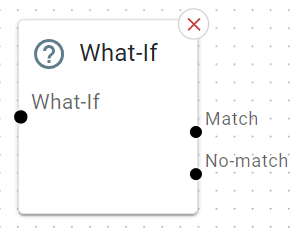
Allows you to branch your call flow based on a condition—like checking if the caller’s number has “VIP” in its name, or if a custom rule is met.
Basic Usage
Drag it onto the canvas after some other node (e.g., Menu).
Configure the condition you want to check (like “Is caller’s phone number on a VIP list?”).
Wire the two (or more) possible outcomes: typically match or no-match.
Detailed Parameters
Node Name

What: A label to identify the logic used (e.g. “Anonymous Calls Filter”).
Parameter
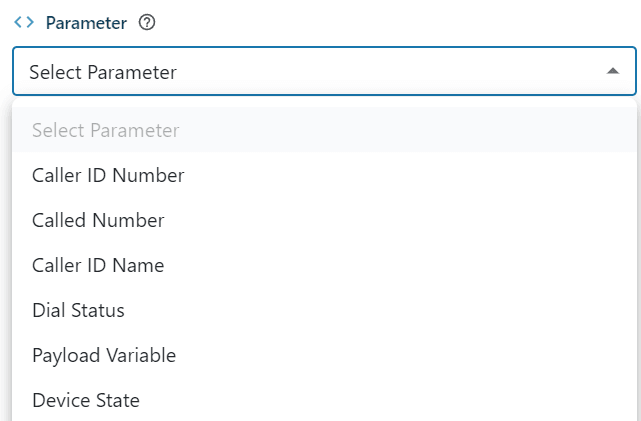
What: Select the item you wish to evaluate against.
Parameters:
Caller ID Number: The ‘calling’ number or CLID.
Called Number: Number your caller has called to land in this IVR.
Caller ID Name: This won’t usually be set, can sometimes exist for internal calls.
Dial Status: Used to detect advanced call states after calling a ring group or single number.
You will need set yourOperatortoEqualsone of the following to match…CHANUNAVAILendpoint not registered, or offline, trunk downCONGESTIONsimilar to aboveNOANSWERtimeout when trying to call, ie rang for 15 seconds then no answerBUSYcalled device reported a busy, or DND is enabledANSWERthe called device answered, the IVR usually ends so this is not applicable here
Device State: You can check to see if an endpoint or extension is on a call, or offline before attempting to call it.
You will need to set your Operator to Equals one of the following to match…NOT_INUSEINUSEBUSYRINGINGONHOLDUNAVAILABLEINVALID
Extension (Device State Only)

What: Select the extension you wish to report the device state for
Operator
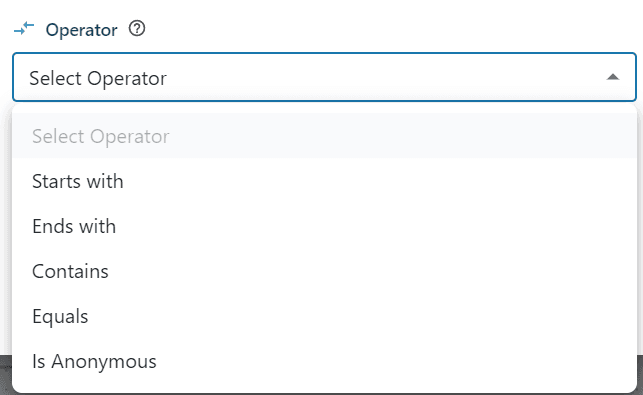
What: Select the comparison operator output true or false (match, no match)
Is Anonymous: Select this along with
Caller ID NumberParameter.
Value

What: The actual number or text you are trying to evaluate
Tip: Numbers will always be in e.164 format without the +, ie 61894883344 or 61411222111
Example Use Case
VIP Routing: If “VIP” is detected in the caller ID, route them to a special ring group or priority queue. Otherwise, go to standard flow.